
What Canadian tax forms are able to be generated in TMO?
Depending on what your account utilizes, you'll see options for:
-
T3 Statement of Trust Income Allocations and Designations
-
T5 Statement of Investment Income
Quick note: Nothing here is legal or tax advice. Always confirm filing rules and tax treatment with your tax advisor or the CRA.
What is different about this process, compared to the US filing system?
The primary difference in the workflow is the last step. Where US filing is able to be electronically transmitted to the IRS, Canadian tax filing in TMO is executed at the end with an export of an XML file, which you will then need to upload to the CRA.
Once you've generated a batch, reviewed the data, and are ready to export, simply click the Action lightning bolt icon that is used to import the data, but instead of importing, you'll select Export to initiate the export process.
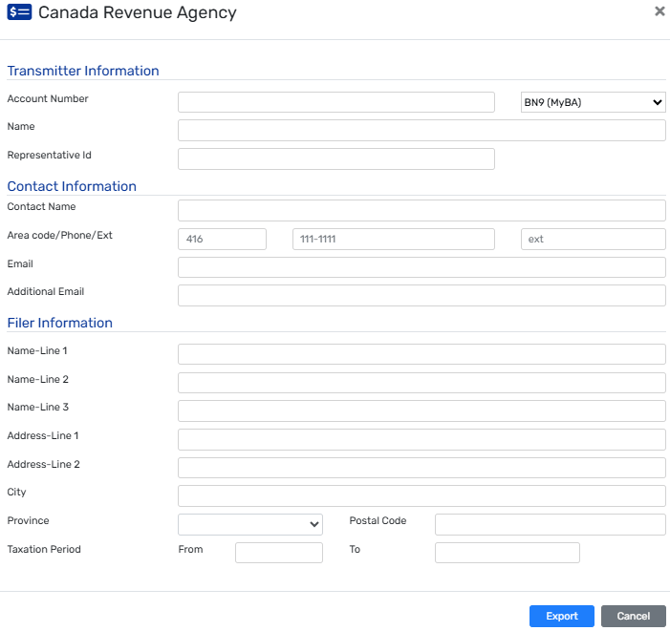
The following screen will be for you to add the appropriate Canada Revenue Agency details, before clicking Export at the bottom.
If you'd like to view more of the general process around creating and importing batch details, please view our recent tax webinar which further reviews the steps in that process.
👉Click here to view the webinar
How does leveraging TMO improve my tax process?
With TMO retaining the granular, line item payment distributions, you can easily generate your tax reporting, harnessing the data already available in the system.
Tips and best Practices
Before You Start
- Start reviewing and spot-checking loan data early to avoid last-minute issues.
- Verify any pending borrower payments and lender checks so they post to the intended year.
Initial Import & Corrections
- For the first payer import, import all payers to validate the full data set; use filters on later imports as needed.
- Expect multiple imports: aim for clean data up front, then re-import after any fixes.
- Make any adjustments directly in the loan files.
Final Steps & Export
- Do not export files until 2025 is fully closed (all checks and payments posted). Plan to complete exports in early 2026.