
Important Note: For this tool to function effectively certain loan volumes are required to train the model. To learn more about adding this to your account, please contact your Account Manager.
Overview
Stay ahead of default risks with our Portfolio Risk predictor tool, powered by your past loan performance data so your indicators provide the accuracy you need.
For an interactive walkthrough, please visit the link here.
The Portfolio Risk Dashboard
With this feature active on your account, a new option appear in the left navigation menu for Portfolio Risk. This dashboard is where you find aggregated insights for your portfolio.
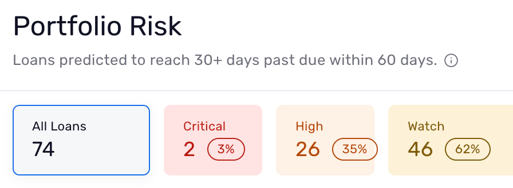
The dashboard is broken down into a couple of simple parts. At the top you'll see a total number of loans, as well as counts based on how many fall into each bucket: Watch, High, and Critical. Selecting an individual bucket at the top filters which loans are visible in the table below.
Reading the Table
The table on the dashboard retains the loan number, loan type, days past due, next payment date, and maturity date, while introducing a few details specific to this screen.
Each loan has a:
-
Risk indicator reflected directly in the table
-
Top drivers, which further validate the score the loan has received. The risk score is on a scale of 0 - 100, with the higher the score indicating an increased likelihood of the loan hitting a 30+ days past due score within a 60-day window
- Interactive 60-day trend line. Hover your cursor over it to track the score throughout the trend.
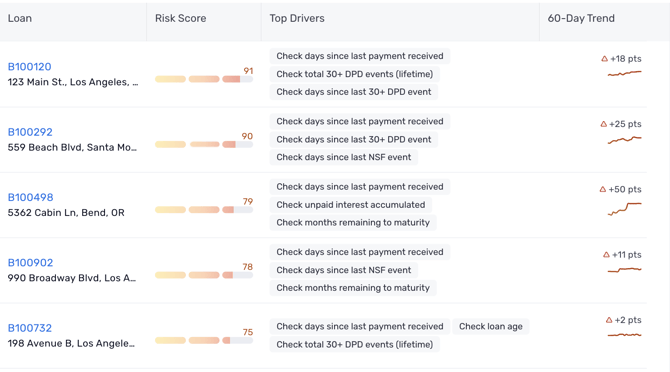
Top drivers include reasons such as: ACH Failure, Days Since Last Payment, NSF Count (Accelerating), and Late Fee Count (Recent). Up to 3 top drivers surface per loan to explain the score.
Note: Scoring recalculates nightly, so the dashboard shows a "Last Scored" timestamp rather than real-time data.
Loan Overview Details
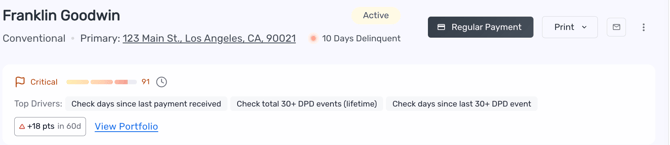
Clicking a loan from the Portfolio Risk dashboard brings you directly to that loan. The loan Overview screen remains largely unchanged, but includes and indication of Portfolio Risk bucket (Watch, High, or Critical), score, and top drivers. Clicking to View Portfolio returns you to the Portfolio Risk Dashboard.
The model currently scores Conventional and Construction loans.
Note: Loans already 30+ days past due are intentionally left off the watchlist, since this tool is meant to be an early-warning tool.